Finding the Right Cursor Alternative for Product Managers
The local development server compiles, and localhost:3000 loads perfectly in the browser window. A functional interactive component sits right there on the screen, generated minutes after writing a detailed prompt; the logic runs flawlessly. Then comes the inevitable friction point when the lead designer or a marketing stakeholder asks to review the progress. Pointing a non-technical peer to a specific branch repository or asking them to install Node dependencies instantly breaks the feedback loop.
When product teams evaluate an AI-assisted alternative for product managers, the conversation often roots itself in this specific bottleneck. Technical product managers want to work on actual logic and flow. They want to interact with real components rather than drawing flat shapes on a static whiteboard. Getting those artifacts out of a local environment, however, requires workflows built specifically for product collaboration.
The Shift Toward Code-Driven Prototyping
We can see this transition clearly in recent industry data. According to recent research on AI adoption, remove or replace with a sourced statistic. This aligns with our internal surveys, where remove or replace with a sourced statistic. The primary focus has migrated rapidly from drafting static text to spinning up interactive interfaces. In fact, a recent report by Forbes highlights that remove or replace with a sourced statistic.
This movement completely changes the artifact handoff. Product management traditionally relied on producing dense text documents detailing every interaction state. Teams report that substituting those documents with living prototypes accelerates internal alignment significantly. The challenge surfaces when non-technical stakeholders need to interact with and approve those prototypes.
Breaking Free from the Local Environment
They require local execution environments, package managers, and terminal access to verify changes. For software engineers, this operating environment feels natural and highly optimized. For a product manager aiming to bypass complex sprint backlogs, the local environment becomes a collaboration silo.
When asking how to give stakeholders visibility into product development without pulling them into an IDE, the answer lies in decoupled preview links. Reviewers need an accessible URL that loads in any standard browser. They need spaces where they can click through a workflow, leave comments on specific elements, and test logic without seeing a single command line interface.
Stakeholder Visibility and Feedback
Designers evaluate padding, typography, and state transitions. Business leaders evaluate user conversion paths and core messaging. Neither group benefits from looking over a product manager's shoulder at a split pane code editor. Keeping stakeholders engaged with real code requires an abstraction layer focused purely on the output.
A strong alternative for product managers must bridge this exact gap. It must compile the generated logic into an instantly accessible format. By separating the creation interface from the review surface, teams can iterate on complex interactions while keeping the entire organization aligned on the actual user experience.
Core Requirements for a Collaborative Option
Different roles have heavily divergent criteria when selecting workspace tools. Engineers evaluate deeply integrated autocomplete speeds and index capabilities. Product teams weigh criteria focused on outcome validation, design system adherence, and documentation velocity. Understanding these priorities helps clarify what represents the best cursor features for product managers.
When testing tools across various product pods, we notice a recurring theme. The ability to pull in existing repository context matters just as much as generating fresh files. Our observations confirm that product managers do not operate in a vacuum. Every new feature must sit cohesively beside hundreds of legacy components.
Maintaining Brand UI Standards
A frequent question running through product channels asks how to prevent AI from generating off-brand UI when trying to move fast. Default code generation tends to rely on generic utility classes, producing layouts that resemble standard template libraries. If a prototype looks disjointed from the core application, designers spend more time critiquing the placeholder visual style than evaluating the core logic.
To maintain consistency, tools need configuration systems that enforce brand guidelines globally. Instead of prompting for specific hex codes or border radii in every single request, the workspace should automatically map generic components to the underlying design system. Defining your token library once prevents a cascade of visual regressions during the rapid iteration phase.
Using Workspaces for Product Documentation
Beyond direct code generation, leveraging these tools for product documentation represents a common use case for technical product leaders. Interrogating a complex codebase to understand existing business logic helps define accurate acceptance criteria. Querying a repository to explain how a specific payment gateway handles failed transactions yields far better insights than searching through outdated wiki pages.
Instead of writing documents based on assumptions, PMs write documents based on the exact logic currently deployed. The ideal workflow captures these insights and immediately attaches them to the new components being proposed.
Comparing Top Workflows in 2026
With some providers adopting strict credit-based usage tiers, teams frequently evaluate their options based on cost predictability and specific workflow adaptations. Exploring AI-assisted alternatives in 2026 reveals distinct categories addressing different segments of the product lifecycle.
When comparing various AI-assisted tools for product teams, the breakdown usually falls into three primary paths. Teams must decide between highly technical terminal agents, developer-focused agentic IDEs, and integrated product workspaces.
Terminal Interfaces and Open Source Tools
Many technical PMs gravitate toward tools that execute directly via terminal prompts. Claude Code offers a terminal-first workflow; verify current pricing before publishing. This suits individuals heavily comfortable with command line interfaces who primarily want to generate shell commands or modify files linearly.
On the open-source side, adoption has surged for completely transparent models. Open-source agent opencode currently sits at over 180,301 GitHub stars, while Cline registers robust usage with over 63,998 stars. Cline operates on a bring-your-own-key approach, allowing users to pay only base model usage costs. These options represent highly capable engines, yet they offer zero built-in infrastructure for sharing visual prototypes with non-technical reviewers.
Agentic IDE Workflows
Agentic IDEs represent the closest structural peers to traditional editors but integrate autonomous reasoning deeper into the file tree. Windsurf is a cursor alternative with pricing that should be verified before publication, providing strong multi-file awareness and context tracking. Zed, an exceptionally lightweight open-source editor, provides up to 2,000 edit predictions per month on its free tier.
For broad organizational deployment, GitHub Copilot is widely used and supports multiple editor ecosystems; verify current pricing before publishing. While all these editors perform remarkably well for software engineers building production architecture, they inherently isolate the builder. They still demand that product managers operate as solo developers locked behind local configuration setups.
The Integrated Technical Workspace
The third path focuses explicitly on the product journey itself. This is where Dazl sits. remove or replace with a sourced, neutral description of the product. Instead of fighting with local server configurations, product managers describe their logic, interact with the resulting components immediately, and simply copy a secure link to share the live prototype with external stakeholders.
Comparing the Top AI-Assisted Tooling Workflows
- Terminal Interfaces and Open Source Tools: Offers command-line-centric workflows for technical users familiar with generating shell commands or modifying files linearly. These tools prioritize flexibility and direct control through command line interfaces.
- Agentic IDE Workflows: Provides integrated development environments with autonomous reasoning for multi-file awareness and context tracking, often used by software engineers. They excel in providing intelligent coding assistance within a familiar development environment.
- Integrated Technical Workspaces: Centralizes the product journey from ideation to hand-off, allowing product managers to interact with components and share secure links without local configuration. These platforms are designed to streamline collaboration and feedback for non-technical stakeholders.
- Low-Code/No-Code Platforms: These environments enable rapid application development through visual interfaces and pre-built components, minimizing the need for manual coding. They are often favored for business users and quick prototyping of simpler applications.
- Specialized Prototyping Tools: Focused exclusively on creating interactive mockups and user flows, these tools allow designers and product managers to simulate user experiences in detail. They often integrate with design systems to maintain brand consistency.
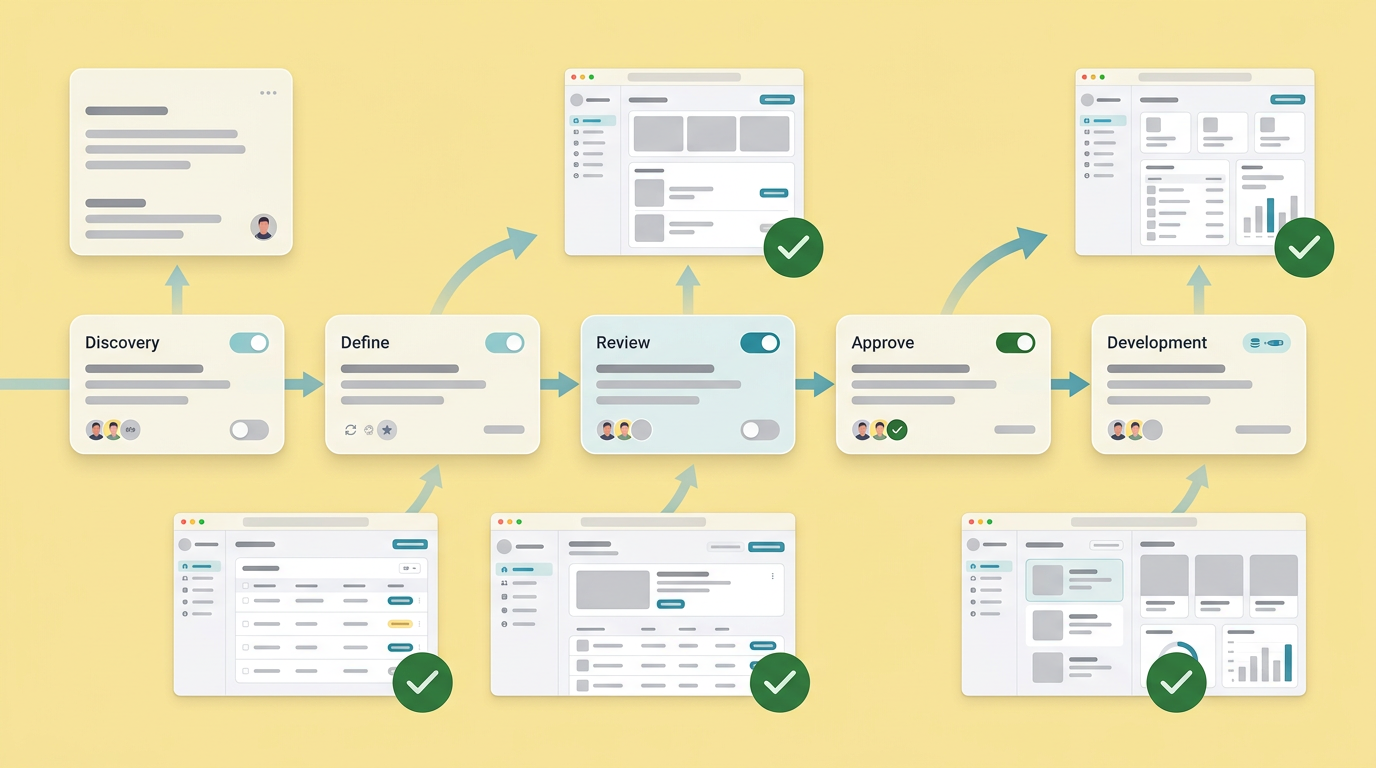
This pathway removes the friction of localized testing. Designers can review interactions in real time, business leaders can click through complex logic gates, and engineers receive artifacts that clearly demonstrate the expected outcomes. The workspace centralizes the conversation around the working prototype.
Machine Learning for Product Managers and Logic Prototyping
Prototyping extends far beyond placing buttons on a canvas. Modern product management frequently involves evaluating algorithmic flows, data ingestion pipelines, and personalization logic. Testing these concepts requires tools capable of stringing together complex conditional statements.
When discussing machine learning for product managers, the conversation often turns toward heavy operational infrastructure like Google Analytics, Amplitude, Databricks, or AWS SageMaker. Product teams utilize these comprehensive systems to track behavior and train robust models deployed in production environments. However, before investing engineering resources into those heavy platforms, PMs need lightweight ways to prototype the underlying logic rules.
Connecting the Data Layer
Validating an intelligent recommendation engine requires manipulating actual JSON payloads and structuring data arrays. A visual drag-and-drop tool cannot effectively simulate sorting algorithms or dynamic filtering based on user role variables. Technical PMs need to write, evaluate, and adjust the logic layer directly.
By utilizing AI-assisted generation, PMs can quickly spin up mock data structures and routing functions. They can simulate how an application responds when an API call fails or when a specific data point returns empty. Prototyping this logic early clarifies exact data requirements before a single ticket reaches the engineering backlog.
Validating Flow Assumptions
Simulating edge cases visually reduces architectural mapping errors later in the product cycle. If a proposed machine learning feature requires five distinct fallback states depending on user connectivity, the product manager can generate and review all five states interactively.
Stakeholders often struggle to comprehend logic diagrams explaining algorithmic decisions. When they can click through a realistic simulation of those decisions, understanding crystallizes immediately. Bridging this specific communication gap prevents costly realignments during late-stage development sprints.
Engineering Alignment and Setting Expectations
Transitioning prototypes into production requires extreme clarity regarding technical boundaries. Generating a fully functional prototype does not mean generating production-ready, scalable architecture. A prototype validates the user experience, tests the business logic, and proves the concept.
The handoff process requires engineering teams and product managers to share a unified understanding of what the generated code actually represents.
Artifacts produced during the ideation phase act as incredibly detailed interactive specifications, not final commits destined for the main production branch. This distinction is crucial for managing expectations and maintaining code quality.
The Clear Expectation Mandate
Managing this relationship actively prevents friction. In recent industry coverage, an engineer noted that technical teams must formulate clear expectations when product managers begin building prototypes with AI. Engineers must communicate which constraints matter most for scalable infrastructure.
When a product manager hands over a working prototype, the engineering team extracts the logic flows, state management requirements, and UI behaviors. They then rebuild or refactor those components according to internal security standards, testing protocols, and performance guidelines. The prototype serves as a detailed interactive specification, not a final production artifact.
Protecting Codebase Integrity
Allowing product managers to experiment freely often raises concerns about code quality degradation. The solution involves keeping experimental work logically separated from core production repositories. Prototypes should live in isolated environments until the outcomes receive approval.
By utilizing shared workspaces over direct repository commits, organizations protect their main codebase. Engineers maintain strict control over merged architecture while product managers retain the freedom to move fast, break conceptual boundaries, and validate complex ideas interactively.
Rethinking the Path to Hand-off
The tools surrounding product development continue adapting to how technical teams actually build. Traditional requirement gathering slows momentum. Text-heavy specification documents leave too much room for subjective interpretation and frequently result in unexpected design compromises weeks after development begins.
Evaluating new pathways out of the standard IDE requires looking closely at who else needs visibility into the process. Generating complex interaction states efficiently matters only if those states can be easily reviewed, tested, and validated by the broader organization. Moving forward, the most effective environments will permanently untangle the act of writing code from the localized isolation of the traditional editor setup. Teams will prioritize accessible artifacts, keeping the focus entirely on validating the product direction.
You and your team can bridge the gap between technical execution and stakeholder visibility by signing up for Dazl.
Get Started

